How we pulled off a zero incident migration across 11 production databases
A step-by-step look at how we upgraded 11 Aurora MySQL clusters to 8.0 without downtime surprises.

In October 2024, Amazon announced it would discontinue support for Aurora MySQL version 2, which was based on MySQL 5.7.
For us, that meant upgrading the database layer that processes our merchant payments across Africa.
We had 11 production Aurora clusters to migrate. Each one powered business-critical services. Some supported legacy Node.js 8.x applications while others ran modern services on Node.js 20.x. Every cluster had its own dependencies, background jobs, and operational edge cases.
And we needed to upgrade them all to MySQL 8.0 without breaking anything. This blog post breaks down how we did it, without a single post-migration incident.
Whether you’re an engineer planning a large upgrade or part of a team modernizing critical systems, we hope you find this insightful.
First, redefine the meaning of “success”
At Paystack, we document infrastructure changes carefully. Before writing a single migration plan, we reviewed notes from previous database upgrades.
One lesson stood out: finishing within a maintenance window does not equal success. In earlier upgrades, systems sometimes appeared healthy immediately after the migration, only for issues to surface later.
In some cases, certain queries began returning incorrect results. These weren’t always obvious and required investigation after traffic had already resumed.
We also learned that minimizing downtime alone wasn’t the only risk. Even when downtime was short, insufficient validation meant subtle errors could slip through. So, for this migration, we defined success as correctness and stability, not just speed.
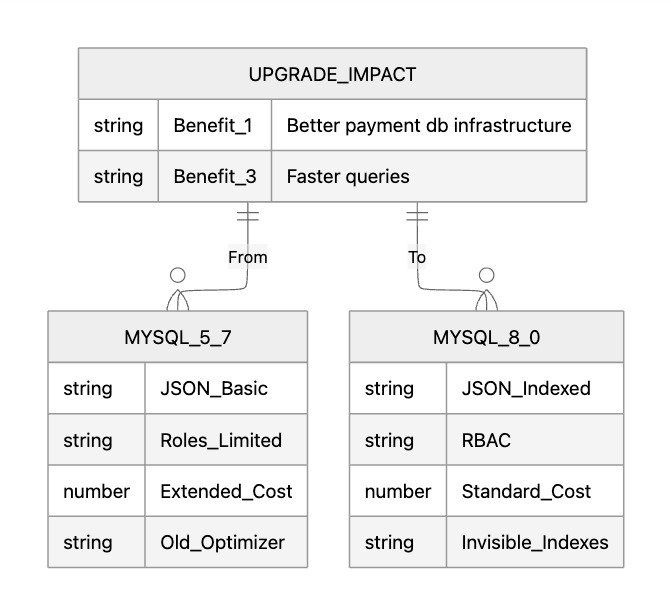
Then, understand what MySQL 8.0 actually changes
With that mindset, the next question was straightforward: what exactly could break?
Before designing our plan, we researched how other teams approached MySQL 8.0 migrations. The more we read, the more we realized this wouldn't be a straightforward upgrade. MySQL 8.0 introduced significant behavioral and compatibility changes.
Many failed migrations happened because teams assumed MySQL 5.7 behavior would carry over unchanged. It doesn’t.
This aligned closely with our own past experiences and confirmed that assumptions based on earlier versions could no longer be relied on.
One example we encountered involved reserved keywords. Some table and column names that worked in MySQL 5.7 became reserved in MySQL 8.0. They caused errors only after upgrade, and could easily be missed without deliberate checks.
These kinds of changes reinforced an important rule: do not assume backward compatibility. Verify it.
That shaped our first step.
Step 1: Map the entire environment
We started with an audit which lasted between four to six weeks in partnership with our DevOps team. We mapped:
- All 11 clusters
- Every application connected to each cluster
- Background jobs and scheduled tasks
- Query patterns and ORM usage
This revealed dozens of integration points across clusters. Many applications continuously ran background tasks, which meant we had to carefully isolate databases during migration to avoid unexpected writes or inconsistent data.
We then ran compatibility testing at two levels.
Database-side checks: We used MySQL's upgrade checker tool to scan our schemas and identify potential breaking changes. This was how we caught several issues, like the naming compatibility errors that would have caused problems during the migration.
Application-side validation: We spun up a MySQL 8.0 staging environment and tested our core applications against it. We validated:
- ORM compatibility
- Connection pooling behavior
- Query execution plans
- Background task stability
Nothing moved to production without passing staging tests.
Step 2: Add external partner
We also brought in MyDBOPS as our migration advisors. While the internal team already had a migration plan, our partners were able to highlight edge cases and risks that typically only surface after many migrations, especially when upgrading at scale.
They'd handled dozens of MySQL 8.0 migrations and could spot issues we might miss. Their input helped refine the process and avoid repeating mistakes seen in earlier upgrades.
Step 3: Start with the most complex cluster
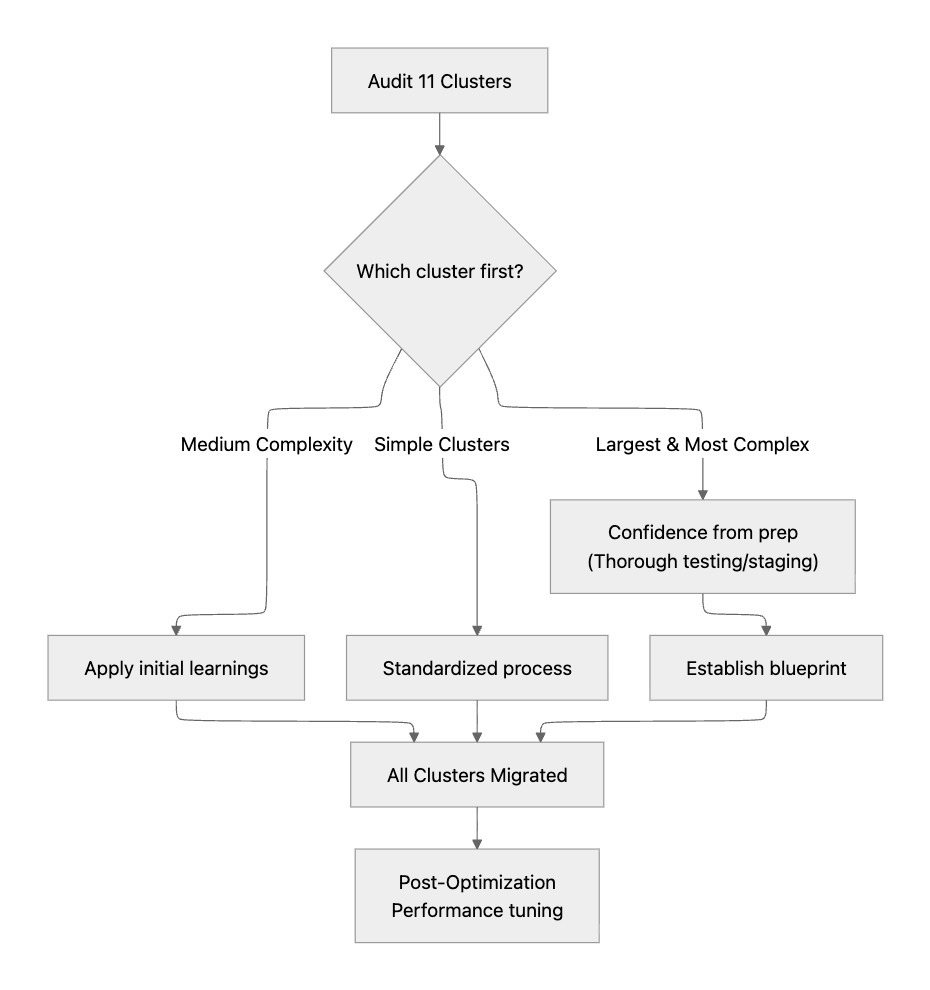
We had 11 clusters, ranging from simple single-application databases to our most complex cluster, which supported more than a dozen critical services. We chose to migrate the largest cluster first.
On the surface, that decision might seem tricky but we were confident in our preparation. We had conducted multiple dry runs, had familiarity from previous upgrade cycles, and received external validation from our partners.
By the time we executed, the process was fully rehearsed. That first migration became the blueprint for the remaining clusters.
Step 4: Choose control over automation
Aurora MySQL does not allow instance-by-instance rolling upgrades within a cluster. Entire clusters must be upgraded together. This meant we couldn't do the gradual, rolling upgrades that minimize downtime. We were going to have a maintenance window, and we needed to make it as short as possible. We planned a three-hour maintenance window and ultimately completed the migration in under two hours.
Rather than rely on AWS's automated migration process, we opted for manual control. This allowed us:
- Shut down traffic deliberately
- Fully isolate databases
- Verify replication integrity
- Control restart order
- Define a clear rollback path
It also gave us a clear rollback path. By isolating the database upfront and controlling how traffic and background processes were stopped and restarted, we could have safely reversed the migration if needed and tried again another day.
In practice, that safeguard was never needed, but knowing it was there made it possible to move forward confidently.
Step 5: Execute a blue-green migration
We adopted a blue-green strategy.
One week before migration
- Stakeholder notifications: We informed merchants and internal teams about the planned maintenance window
- Development freeze: Implemented DDL freeze to prevent schema changes during migration
- Replication setup: Configured DMS replication between old and new clusters
- Application inventory: Double-checked that all applications connected via CNAMEs (this would be crucial for the switchover)
Day of migration
T-2 hours: Final preparation
- Green cluster provisioned and fully synced
- Monitoring extended to cover new infrastructure
- Maintenance windows activated on edge services
T-0: Migration Start
- System health checks completed
- All applications connecting to the blue cluster shut down
- Blue cluster set to read-only mode
- Traffic completely blocked at the edge
T+15 minutes: Data sync verification
- Final replication sync completed
- Binary log positions verified between clusters
- Database snapshot taken as final backup
T+30 minutes: The switch
- CNAME records updated to point to green cluster
- Applications started up progressively
- Health checks validated for each service
T+45 minutes: Traffic restoration
- Edge services brought back online
- Traffic gradually restored
- Real-time monitoring of all metrics
T+2 hours: Migration complete
- All systems operational
- Performance metrics normal
- Blue cluster decommissioned
The week after
- Continuous monitoring of the new infrastructure
- Performance optimization based on PMM insights
- Documentation updates for the next cluster
Get more stories like this
Subscribe to our newsletter to receive updates when new articles go live on the Paystack Blog.
Subscribe here →The unexpected replication challenge
Despite careful planning and a smooth run across most clusters, a significant challenge emerged surprisingly late in the process, during the migration of a cluster we had initially expected to be one of the easiest.
This cluster introduced an additional change, migrating certain database columns from a smaller integer type to a larger one to prevent future capacity issues. The change itself was straightforward in theory, but in practice, it exposed unexpected replication issues. During dry runs, we discovered that data replication behaved inconsistently across tables; some tables replicated cleanly, while others failed in ways we hadn’t seen before.
This became a temporary blocker and forced us to pause, reassess, and design a more careful replication strategy rather than pushing the problem into the future. That moment reinforced the value of detailed preparation and dry runs. Because this issue surfaced before production, we had the space to step back, run additional tests, and combine multiple replication approaches in a way that resolved the problem safely. Had this been discovered during a live migration, it would have introduced far more risk and pressure.
What we learned
Documentation pays off: Our detailed notes from previous migrations saved us from repeating old mistakes and gave us a head start on planning.
Dry runs are essential: We ran through the migration process multiple times in staging. By the time we hit production, everyone knew exactly what to do and when.
Communication matters: We kept all stakeholders informed throughout the process. No surprises, no complaints.
External expertise helps: MyDBOPS brought knowledge we didn't have internally. The combination of their migration experience and our domain knowledge was powerful.
Start with confidence: Beginning with our largest, most complex cluster worked because we'd done our homework. The thorough testing and validation gave us confidence to tackle the hardest problem first.
The results
We completed all 11 migrations before Amazon’s extended support auto-enrollment deadline. More importantly, we did it without any post-migration incidents, everything worked exactly as expected.
The upgrade gave us better monitoring through Percona Monitoring Management, which helped us identify and optimize several slow queries. We also gained access to MySQL 8.0's performance improvements and security enhancements.
From a cost perspective, avoiding the extended support fees saved us over $170,000 over the first two years, with additional savings in year three. But the real value was in modernizing our infrastructure and proving we could execute complex migrations reliably.
Beyond performance improvements and cost savings, the most meaningful long-term impact for us was increased confidence, both internally and for the merchants who rely on Paystack every day. Upgrading our database infrastructure strengthened the security of our systems, giving merchants greater assurance that their data and their customers’ data are well protected.
What's next
This migration established a proven methodology for future database upgrades. One of the most important outcomes of this work was the feedback it generated for future migrations, where automation would help, what steps can be standardized, and how this process can evolve as the number of database clusters grows.
We now have a repeatable framework for future database upgrades:
- Structured audits
- Two-layer compatibility testing
- Blue-green isolation
- Rehearsed execution
- Clear rollback paths
- Post-migration documentation
Each migration becomes both an execution and a learning exercise. That feedback loop — documenting what worked, what didn’t, and what needs to change next time — is what allows complex systems to keep improving without becoming fragile. More importantly, it strengthened our team's ability to handle complex, high-stakes infrastructure projects.
As Paystack grows, our infrastructure will keep evolving with it. This migration didn’t just modernize our databases. It strengthened the foundation that thousands of businesses rely on every day, and it proved we can execute critical upgrades without compromising reliability.

