Introducing the newly rebuilt Paystack merchant app
Accept in-person payments and manage more of your Paystack business from your phone.
Today, we’re excited to introduce a redesigned and improved Paystack merchant app, built to help you accept in-person payments and manage more of your business from your phone.
We first built the mobile app to give merchants a simple way to monitor their businesses while away from their computers. Since then, Paystack has grown, merchants have gained access to more products and payment methods, and more businesses have started managing their day-to-day work from their phones. The app, however, hadn’t kept pace with those changes.
Even so, thousands of merchants continued to rely on it to check transactions, monitor revenue and balances, issue refunds, and get notified when customers paid. This made two things clear: the app was already an important part of how merchants used Paystack, but it needed to help them do much more than monitor their businesses.
So we rebuilt it around the moments when having Paystack on your phone matters most.
In this post, we’ll take you through what has changed and how the improved app can help you accept payments, stay on top of your money, and manage your business wherever you are.
What’s new and improved
The updated app introduces new capabilities, including in-person payments and passkey sign-in. It also allows businesses that process payments in multiple currencies to view their transactions, balances, and upcoming payouts across all available currencies, rather than seeing only their default currency.
We’ve also redesigned familiar workflows, making it easier to monitor your business, find and manage transactions, resolve disputes, and request payments from customers.
Accept in-person payments from your phone
The most significant new capability is in-person payments.
Businesses don’t only meet customers online. Payments also happen across shop counters, at events, during deliveries, and anywhere else a customer is ready to buy. In those moments, being able to accept and confirm a payment quickly can help you complete the sale and keep your business moving.
With the updated Paystack app, you can initiate an in-person payment from your phone. There’s no separate device to set up, and you don’t need to move to your computer to complete the transaction.
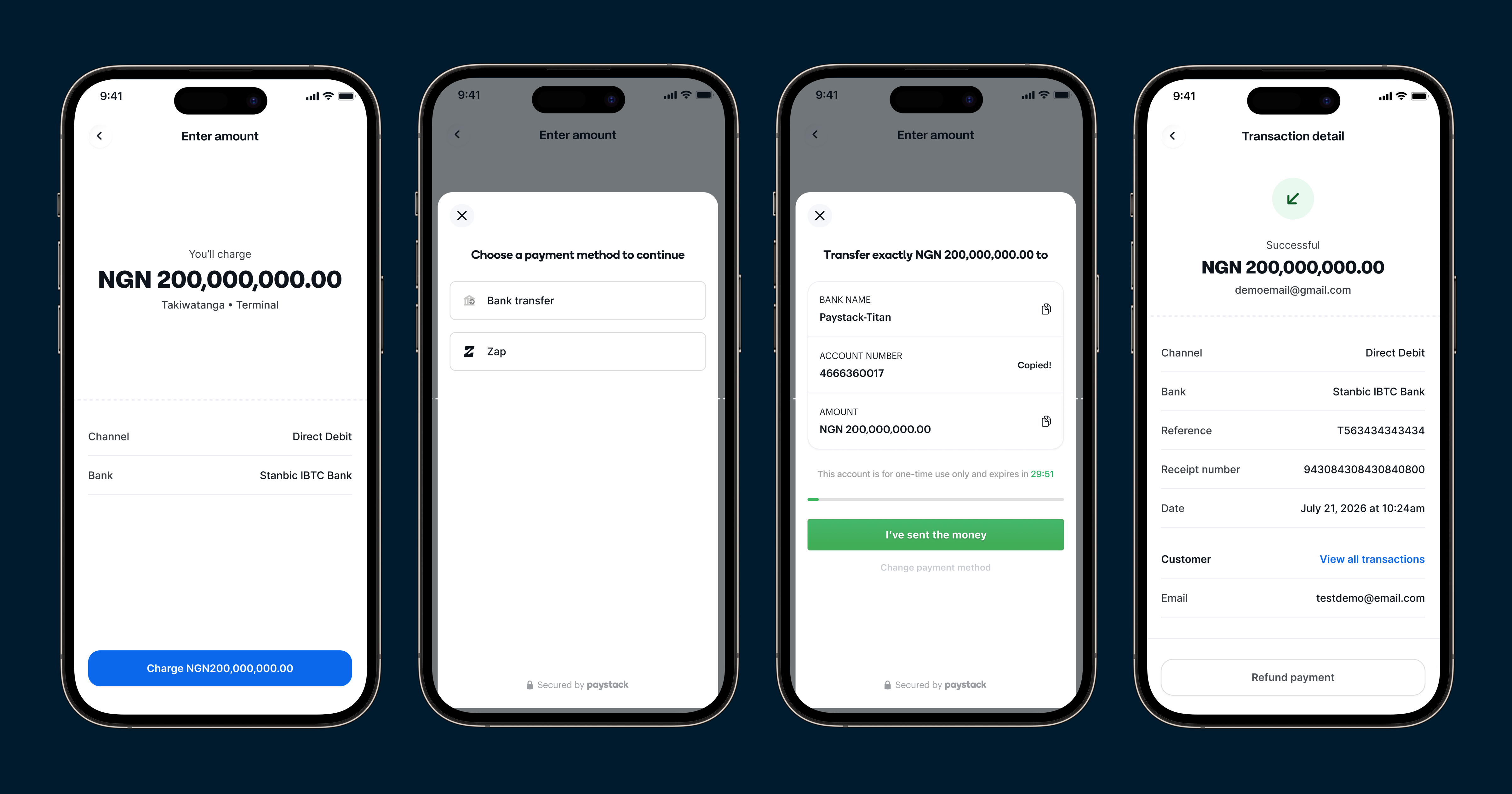
Simply enter the amount you want to collect, add a description, and tap Charge. Depending on your country, your customer can pay using options such as bank transfer, Zap by Paystack in Nigeria, or mobile money in Ghana and Kenya.
Once the payment succeeds, you’ll see the confirmation immediately and receive a push notification. The transaction will also appear in your payment history, giving you a record of the sale and making it easy to review the details or issue a refund if necessary.
The payment options shown in the app will depend on your country and the payment methods enabled for your business.
See how your business is doing at a glance
When you’re running a business, you often need quick answers: How much have we made? What’s available in our balance? When is the next payout? Are there any disputes that need attention?
The new home screen brings this information together in one place. As soon as you open the app, you can see your revenue, Paystack balance, upcoming payouts, recent successful payments, open disputes, and a seven-day view of your successful payment activity.
This gives you a quick picture of how your business is doing, without having to move through several screens or wait until you’re back at your computer.
Manage multiple businesses and currencies
If you manage more than one business with Paystack, switching between them should be straightforward.
You can now move between the businesses connected to your Paystack account and view the information relevant to each one. The app also supports multiple currencies, so you can see your balances and upcoming payouts in the currencies available to your business.
This is particularly useful for businesses that collect payments in more than one currency or manage different Paystack businesses from the same account.
Find payments and take action quickly
When a customer has a question about a payment, finding the right transaction quickly can make it easier to resolve the issue while they’re still with you.
You can search your transaction history and view payments across different statuses, including successful, pending, abandoned, reversed, and refunded transactions. Open any transaction to understand what happened, review its details, or issue a refund.
You’ll also receive a push notification whenever a new payment arrives. This means you can confirm that you’ve been paid without repeatedly refreshing your Dashboard or email.
Sign in more easily with passkeys
Getting into your account should be quick without compromising security.
The app now supports passkeys. If you already use a passkey for your Paystack Dashboard, you can use the same one on the app and sign in using the biometric authentication supported by your device.
You can also manage your password and two-factor authentication settings directly from the app.
Find your way around more easily
We’ve reorganized the app so that important information and everyday actions are easier to find.
Payments, payment requests, business information, and settings now sit within a clearer structure designed specifically for a phone. You can also manage the payment methods available to your customers and reach Paystack Support directly from the app.
The result is a smoother experience that helps you spend less time looking for what you need and more time running your business.
Why these changes matter
Together, these changes move the Paystack app from something merchants mainly used to monitor their businesses to a tool that helps them run more of those businesses from their phones.
You can accept a payment while a customer is in front of you, confirm that the money has arrived, respond to a transaction question, track an upcoming payout, or send a payment request without waiting until you’re back at your computer.
The goal is to help you act more quickly, stay informed, and keep your business moving wherever work happens.
Download or update the Paystack app
The updated Paystack app is available on iOS and Android to Paystack merchants in every market where Paystack operates. In-person payments are currently available in Ghana, Kenya, and Nigeria, with South Africa coming soon.
If you already have the app, update it from the App Store or Google Play to access the new capabilities and improved experience.
If you haven’t used the app before, download it and sign in with your existing Paystack email address and password. If you already use a passkey to access your Paystack Dashboard on the web, you can use the same passkey to sign in to the app.
Ready to do more from your phone?
Download the Paystack merchant app on your iPhone and take more of your business with you.
Download on iOSMore of your business, right on your phone
Download the Paystack merchant app for Android and stay on top of your business wherever you are.
Get it on Google PlayWhat comes next
This update gives us a stronger foundation for the Paystack app, but there’s still more we want to improve.
Download or update the app, try the new capabilities, and let us know what works well, what could be better, and what you’d like to be able to do next.
You can share your feedback by opening Support in the app or by emailing us at [email protected].
What we build next will be shaped by how you use the app and what you tell us.

