Paystack is now live on Flowcart
African businesses can now sell on Whatsapp and get paid instantly using Paystack
As commerce continues to move into chat, we’re focused on making sure African businesses can sell, and get paid, where conversations are already happening.
Today, we’re excited to announce that Paystack is partnering with Flowcart (formerly Sukhiba), a conversational commerce platform that helps businesses sell on WhatsApp.
With Paystack now built directly into Flowcart, merchants in Kenya, Nigeria, and South Africa can create end-to-end shopping experiences inside WhatsApp, from product discovery to secure payment.
Why WhatsApp is where business happens
Whatsapp is the most used messaging app in Kenya, Nigeria, and South Africa. It’s where people chat, watch videos, read the news, and increasingly, where they shop.
For many businesses, WhatsApp is already a natural place to connect with customers. Flowcart makes it even easier by turning those conversations into a complete sales experience.
Flowcart transforms WhatsApp into a storefront, so you can:
- Showcase your products with catalogs
- Keep customers updated with order tracking
- Offer quick, personall customer support
And now, with Paystack integrated, you can go one step further: let customers browse, order, and pay, all without leaving the chat.
Getting started is easy
Here's how to start selling on WhatsApp with Paystack and Flowcart:
- Sign up for a Flowcart account here
- Connect your Paystack account during onboarding
- Set up your WhatsApp business profile and product catalog
- Start selling and accepting payments, directly inside WhatsApp
If you already use Paystack, simply link your Flowcart account from your Paystack Dashboard to activate the integration.
How to set up Paystack on Flowcart
To start receiving payments, you’ll need to connect your Paystack account to Flowcart using your API keys. It only takes a few minutes.
Step 1: Get your Paystack API Keys
- Log in to your Paystack Dashboard
- Click "Settings" at the bottom left
Go to "API Keys & Webhooks" - Copy your Live Secret Key and Live Public Key
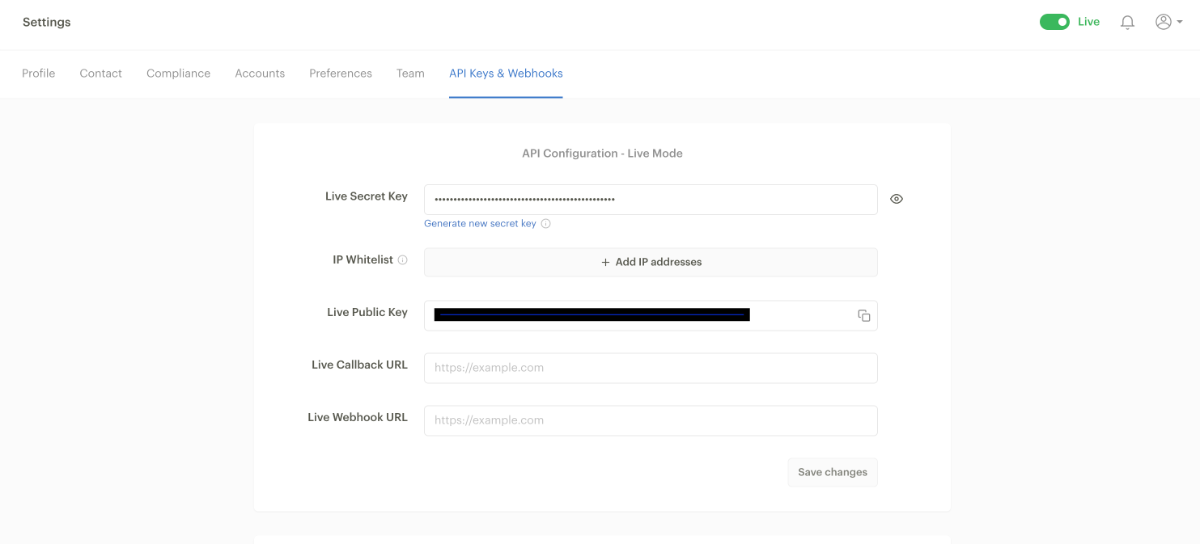
Step 2: Add your keys to Flowcart
- Log in to your Flowcart Dashboard
- Go to Settings → Payment Gateway Integrations
- Select Paystack, then paste your Live Secret Key and Live Public Key
- Click Save
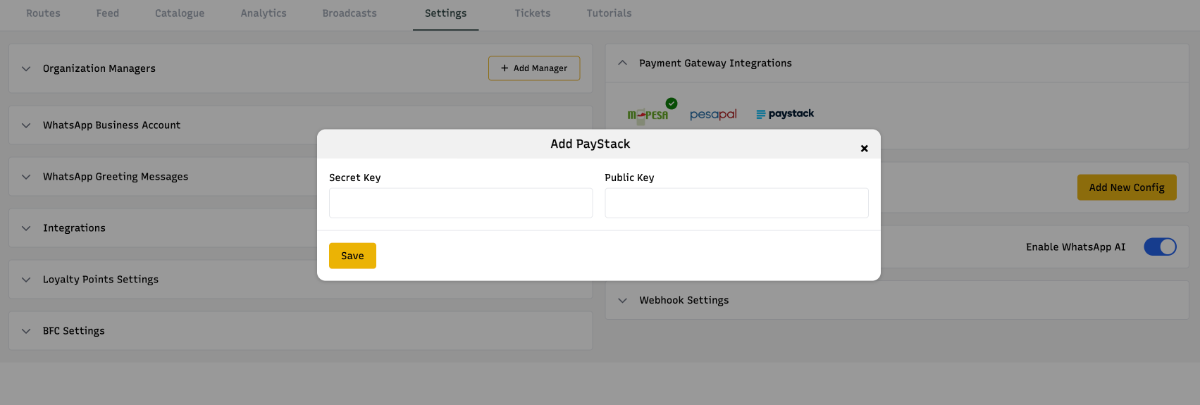
Once connected, your WhatsApp storefront will be fully equipped to accept secure payments through Paystack. For a more detailed walkthrough of the integration process, check out this guide.
What businesses can do with Paystack and Flowcart
With this integration, Africans merchants using Flowcart can:
- Accept payments inside WhatsApp using Paystack
- Offer flexible payment options like cards, mobile money, and bank transfers
- Track transactions in real-time with a simple Dashboard
- Protect revenue with Paystack's fraud detection and dispute management tools.
What’s next
Over the coming months, we’ll roll out even more features and expand the integration to more African markets.
At Paystack, we’re building simple, accessible tools to help ambitious businesses grow. This partnership with Flowcart is one more step in that direction.
If you have any questions about setting up Paystack on Flowcart, reach out at [email protected]. We’re happy to help 💙

